

Play FreeCell Free Online
FreeCell is the solitaire where every card is face up from the start, so there is no luck left in the deck — just a puzzle to think through at your own pace. It came with every Windows computer for decades, and this is that same game, made easy to see and easy to play. It runs straight in your browser with no download, no installer, and no account. Open the page and the cards are dealt.
The cards are deliberately large, with a big number and suit in the corner of every one, so a column of overlapping cards stays readable even on a phone. You do not have to drag anything: tap a card and it moves to the right place on its own — up to its Home pile, onto another column, or into a free cell. If you would rather choose the spot yourself, Settings lets you switch to tapping the card and then tapping where it should go — and dragging always works too.
Every deal has a number, just like the classic games, so you can play a favourite again or tell a friend which one to try. There is no clock, no score, and nothing to lose. Undo is unlimited and hints are unlimited. Cards that are safe to send home go up by themselves, and once every column is in order the game finishes the piles for you. If you close the tab, your game is saved and waiting when you come back.
How to Play FreeCell
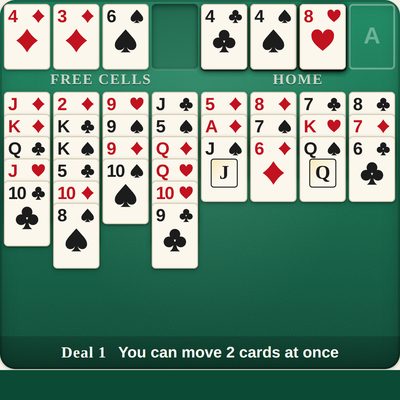
The aim is to move all 52 cards onto the four Home piles at the top right of the table — one pile for each suit, starting with the Ace and going up in order to the King.
- The columns: the eight columns hold every card, all face up. A card can be placed on a column when it is one lower than the card showing there and the other colour — a red 6 on a black 7, a black Jack on a red Queen. Any card can be placed on an empty column.
- The free cells: the four spaces at the top left each hold one card. Park a card there to reach the one underneath it, and bring it back down whenever there is a place for it. Empty cells are what let you move several cards at once, so keep them clear when you can.
- Moving a run: a run of cards in order can move together, as long as the run is short enough for the free space you have. The line under the table always says how many cards you can move at once.
- Tap to move: tap any card and it moves to the best place by itself. Tap a card that is part of a run and the whole run moves together.
- Hint points at a good move and says it in words. Undo takes back your last move, as many times as you like.
Frequently Asked Questions
Is this FreeCell game free?
Yes. It is completely free to play, with no purchases, subscriptions, or hidden fees.
Do I need to download anything?
No. It runs directly in your web browser on a computer, tablet, or phone. There is no app to install and no account to create.
How do you play FreeCell?
All 52 cards are dealt face up into eight columns. The goal is to move every card onto the four Home piles at the top right, one pile for each suit, starting with the Ace and going up to the King. On the columns, cards are placed in descending order and alternating colours — a red 6 on a black 7, for example. Any card can be placed on an empty column, and the four free cells at the top left each hold one card while you work.
What are the free cells for?
They are four parking spaces. Any card can be set aside in an empty cell to get it out of the way, and brought back down whenever there is a place for it. The fewer cells you fill, the more cards you can move at once, so try to keep them clear.
How many cards can I move at once?
One more than the number of empty free cells, doubled for every empty column. With all four cells empty you can move five cards together; with two cells empty, three. The line under the table always tells you the current number, and the game explains when a run is too long to move.
Do I have to drag the cards?
No. Tapping a card moves it to the right place by itself — to its Home pile, onto another column, or into a free cell. You can still drag cards if you prefer, and in Settings you can switch to choosing the destination yourself.
Is there a time limit or a score?
No. There is no clock, no countdown, and no score to protect. Take as long as you like over each move.
Can I undo a move?
Yes, undo is unlimited. Press Undo as many times as you like, all the way back to the start of the game.
Can every FreeCell deal be won?
Very nearly. The deals here are numbered like the classic games, and of the 32,000 in the standard set only one (deal 11,982) cannot be solved — and the game never picks that one for you. Every deal has a number, so you can play a favourite again or share it with a friend.
Does it save my game?
Yes. Your game is saved automatically in your browser, so you can close the tab and pick up exactly where you left off.