

Play Solitaire Free Online
This is the classic Solitaire everyone knows — the one that came with every computer for thirty years, also called Klondike or Patience — made easy to see and easy to play. It runs straight in your browser with no download, no installer, and no account. Open the page and the cards are dealt.
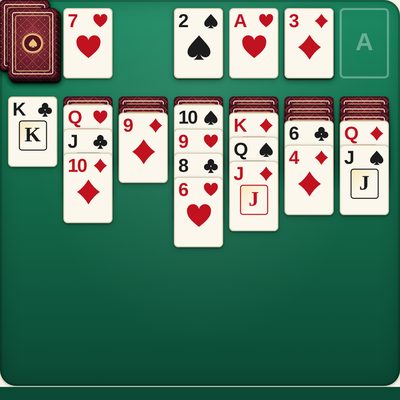
The cards are deliberately large, with a big number and suit in the corner of every one, so a row of overlapping cards stays readable even on a phone. You do not have to drag anything: tap a card and it moves to the right place on its own, going to its suit pile at the top whenever it can. If you would rather choose the spot yourself, Settings lets you switch to tapping the card and then tapping where it should go — and dragging always works too.
There is no clock, no score, and nothing to lose. Undo is unlimited, hints are unlimited, and you can turn the deck over as many times as you like. When every card is showing, the game finishes the piles for you. If you close the tab, your game is saved and waiting when you come back.
How to Play Solitaire
The aim is to move all 52 cards onto the four piles at the top of the table — one pile for each suit, starting with the Ace and going up in order to the King.
- The columns: the seven columns below hold the cards you can work with. A card can be placed on a column when it is one lower than the card showing there and the other colour — a red 6 on a black 7, a black Jack on a red Queen. Only a King can be placed on an empty column.
- Face-down cards: when you move the last face-up card off a column, the card underneath turns over. Uncovering those hidden cards is how you win.
- The deck: when you are stuck, tap the deck in the top-left corner to turn over a card. When the deck runs out, tap it again to go through it from the start — as often as you like.
- Tap to move: tap any face-up card and it moves to the best place by itself. Tap a card that is part of a run and the whole run moves together.
- Hint points at a good move and says it in words. Undo takes back your last move, as many times as you like.
Frequently Asked Questions
Is this Solitaire game free?
Yes. It is completely free to play, with no purchases, subscriptions, or hidden fees.
Do I need to download anything?
No. It runs directly in your web browser on a computer, tablet, or phone. There is no app to install and no account to create.
How do you play Solitaire?
The goal is to move all 52 cards onto the four piles at the top, one pile for each suit, starting with the Ace and going up to the King. On the columns below, cards are placed in descending order and alternating colours — a red 6 on a black 7, for example. Only a King can be placed on an empty column. Turn over cards from the deck when you run out of moves.
Do I have to drag the cards?
No. Tapping a card moves it to the right place by itself. You can still drag cards if you prefer, and in Settings you can switch to choosing the destination yourself.
Is there a time limit or a score?
No. There is no clock, no countdown, and no score to protect. Take as long as you like over each move.
Can I undo a move?
Yes, undo is unlimited. Press Undo as many times as you like, all the way back to the start of the game.
What is the difference between drawing one card and three?
Drawing one card at a time is the easier, more relaxed way to play and is the default here. Drawing three at a time is the traditional harder version, where only the top of the three can be played. You can switch in Settings, and you can go through the deck as often as you like either way.
Does it save my game?
Yes. Your game is saved automatically in your browser, so you can close the tab and pick up exactly where you left off.