

Play Word Search Free Online
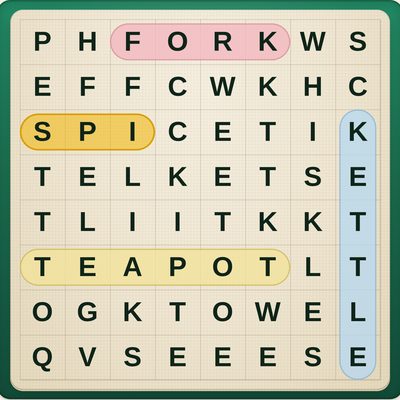
This is the word search from the puzzle page of the newspaper — a grid of letters with a list of words hidden in it — made easy to see and easy to play. It runs straight in your browser with no download, no installer, and no account. Open the page and today's puzzle is waiting on the table.
The letters are deliberately large and dark on a warm paper sheet, so the grid stays readable even on a phone. You do not have to drag anything: tap the first letter of a word and then its last letter, and the word is coloured in and crossed off the list. Dragging across a word works too, and a wrong tap costs nothing at all.
There is no clock, no score, and nothing to lose. Hints are unlimited — each one lights up the first letter of a word you have not found yet. Every day brings a fresh themed puzzle that is the same for everyone, and New puzzle gives you another whenever you like. If you close the tab, your puzzle is saved and waiting when you come back.
How to Play Word Search
The aim is to find every word on the list in the grid of letters. Each word is hidden in a straight line, and the theme — Garden, Birds, Baking — tells you what kind of words to expect.
- Find a word: look for its first letter, then follow the line of letters from it. To begin with, words only run left to right or top to bottom.
- Mark it: tap the first letter (it lights up gold), then tap the last letter. Or drag your finger or mouse from the first letter to the last. Either way the word is coloured in and crossed off the list.
- Hint lights up the first letter of a word you have not found yet, as often as you like.
- Today's puzzle is the day's shared puzzle; New puzzle makes another one on a random theme.
- Settings lets you choose the grid size, whether words can run diagonally and backwards, and capital or small letters.
Frequently Asked Questions
Is this Word Search free?
Yes. It is completely free to play, with no purchases, subscriptions, or hidden fees.
Do I need to download anything?
No. It runs directly in your web browser on a computer, tablet, or phone. There is no app to install and no account to create.
How do you play Word Search?
A list of words is hidden in a grid of letters. Find each word in the grid and mark it: drag your finger or mouse from its first letter to its last, or simply tap the first letter and then the last letter. Found words are coloured in and crossed off the list. When every word is found, the puzzle is solved.
Do I have to drag across the letters?
No. Tapping the first letter and then the last letter of a word works just as well, and a wrong tap costs nothing. Dragging works too if you prefer it.
Which way do the words go?
To begin with, words only read left to right or top to bottom. In Settings you can choose All directions, which also hides words diagonally and backwards for more of a challenge.
What is Today's puzzle?
Every day there is one new puzzle on a fresh theme — Garden, Birds, Baking and so on — that is the same for everyone who plays that day. You can also press New puzzle for another one whenever you like.
Is there a time limit or a score?
No. There is no clock, no countdown, and no score. Take as long as you like, and use as many hints as you want.
Can I make the letters bigger?
Yes. The Small puzzle has the largest letters, and the grid always fits your screen without scrolling sideways. In Settings you can also switch between capital and small letters.
Does it save my puzzle?
Yes. Your puzzle and the words you have found are saved automatically in your browser, so you can close the tab and carry on later exactly where you left off.